$0.00
0

We have a team here at Computype that specializes in barcode label printers, printer processes, and printer troubleshooting. They work with a variety of makes and models from multiple manufacturers giving them a solid knowledge-base of how a variety of printers perform in different environments and in comparison to one another. One of the many label printer series our team has worked with is the Zebra ZT series.

As an authorized distributor of Zebra label printers, we actively promote and provide our customers with their equipment. We work with Zebra because after years of experience working with printers of all kinds, Zebra printers have consistently promised and delivered quality and high performance results that meet the needs of our customers.

Let’s take an in depth look at the ZT series as a whole and the three subseries it’s comprised of. We’ll discuss the features, benefits, limitations, and cost of all three.

What is the Zebra ZT series?

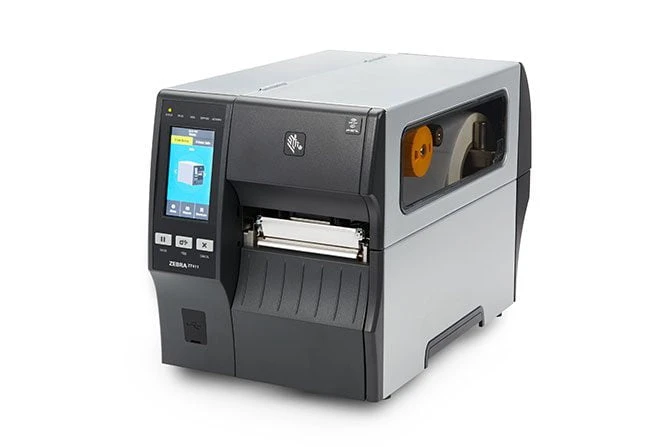
Zebra’s ZT series refers to their line of industrial printers. The “T” in ZT stands for tabletop, meaning compared to their desktop counterparts they are much larger and more robust. Though they are made with industrial environments in mind, these printers are extremely versatile and have proven useful in a diverse array of applications ranging from lab environments to manufacturing centers.

Most notably the ZT series differs from smaller desktop models in its larger size and ability to accommodate much larger volume print jobs—if you’re looking for something more compact for smaller label batches check out the ZD Series.

Within the ZT printer line are three sub-series: the ZT 200 series, the recently upgraded ZT 400 series and the ZT 600 series. All three are meant to serve facilities with different needs, so let’s take a look at each individually:

Zebra ZT 200 series

The ZT 200 Series models are the most basic models in the ZT series. With a 3-button, no-screen interface, standard dpi range and standard media capacity these printers keep it simple and serve as a great upgrade to a desktop solution if label printing volumes are on the rise.

The only major difference between the ZT 210 and ZT 220 is the difference in ribbon capacity. With a 450m ribbon capacity, the ZT 220 requires less frequent refill stops than the 210.

Ideal for moderate volume print jobs

In comparison to smaller desktop models, this printer is prepared to handle significantly larger jobs and will serve as a great higher throughput upgrade from a desktop solution.

Simple design and features

The interface is simple and all the standard features are there. This might not sound like much of a compliment but, in this case the minimalistic interface provides a user friendly experience and the lack of extra features keeps the focus on printing barcodes and an easy-to-train and operate system.

Budget friendly

Zebra is calling the printers in the ZT 200 series the ‘value models’. By keeping it simple they are able to offer all the most valuable features of an industrial printer at an economical price point.

Not for small scale printing

With the dpi options being 203 or 300 dpi this printer can provide clear crisp and scannable barcodes so long as they aren’t being printed at an extremely small scale.

A great majority of print jobs look great at 203 or 300 dpi, but scanning issues can arise when extremely small barcodes need to be printed.

Not intended for high volume print jobs

Although it is an industrial printer and is intended for higher volume printing than its desktop counterparts, the ZT 200 series is limited in its printing capabilities.

When it comes to higher volume label printing applications, these models are on the lower end of the throughput spectrum and would be best suited for moderate volume applications. These are not intended for 24/7 operation.

No screen

Although the lack of a screen can be helpful when it comes to keeping things simple, a bright and colorful screen can allow for at-a-glance status updates from a distance. This is helpful when an operator might not be available to keep a close eye on the printer.

Cost

The ZT 200 series is comprised of the industrial value models, due to their simplicity and economical price point.

If your facility is looking for an easy to use upgrade to a desktop printer or a moderate volume solution without any complicated features, a ZT 200 series model might be suitable.

The ZT 200 series starts around $980 (less than some desktop models) making it a budget friendly choice for any moderate volume application.

Zebra ZT 400 Series

The ZT 400 series is a long-time customer favorite, which is why Zebra decided to give it an upgrade. The familiar ZT 410 and 420 models are now the ZT 411 and 421.

The 411 and 421 continue to offer high resolution, width and RFID options but with a new, easier to navigate touchscreen interface.

User friendly interface

A colorful LCD touch display replaces the backlit screen and buttons on the previous ZT 400 series models for a more intuitive user experience and at-a-glance status recognition.

RFID

The ZT 400 series is capable of encoding UHF RFID tags so you can get ahead in implementing a smarter label solution.

Including RFID in your labeling solution can improve accuracy and efficiency by offering a faster scanning option and a back-up ID opportunity.

Ideal for larger volume applications

The 400 series is a great match for moderate to larger volume applications where they will be operating several hours each day. The high print speed options also let you print more in a limited span of time.

Wide printing capabilities

The main difference between the ZT 411 and the ZT 421 is the print width capacity. The ZT 421 is capable of print widths up to 6.6 inches!

Most label applications don’t require widths larger than 4 inches which makes it difficult to find label printers capable of higher width capacities. For those who have more unique applications that require wider labels, the ZT 421 is a great fit.

High DPI will slow you down

Although the option to purchase a 600 dpi model of the ZT 400 series (or 600 series) model is available, upgrading your print quality will lead to lower print speeds.

Under most circumstances, this won’t be an issue since industrial printers aren’t often used to print at small scale. A 203 or 300 dpi model will suit most applications.

Can’t print 24/7

The ZT 400 series is certainly intended for higher volume printing, however, it isn’t intended to print around the clock.

Cost

The best part about the upgrades to the 400 series is that they didn’t drive up the cost. Zebra is offering these future-ready printers for the same economical price as their predecessors. You can expect to spend at least $1,700 on your ZT 400 series printer and a bit more for each additional feature or upgrade you choose.

Zebra ZT 600 series

The ZT 600 is a very high-powered printer for high volume printing applications. It’s customizable in many of the ways the 400 series is–with RFID capabilities and an extended width option–but it features a simpler interface and a more durable outer casing.

This printer was built for harsh conditions and high demand making it ideal for fast-paced environments.

Ideal for 24/7 operation

The ZT 600 series features an extremely robust print engine suitable for around the clock operation. If your facility is struggling to find a printer capable of keeping up with your demand a 600 model is definitely worth checking out.

High speed printing

This printer was made with fast-paced environments in mind, so it only makes sense it would feature print speeds that can keep up with demand.

However, we always recommend slowing down when you can to optimize the scannability of your barcodes and reduce printhead wear.

Super durable

The ZT 600 Series features a metal media covering to protect your media and inner mechanisms from damage. This is especially helpful in industrial environments where printers are prone to damage from dust and debris. A window on the side also allows for easy media monitoring even when the protective case is closed.

Best suited for applications where it will run constantly

Very robust print engines run best when they are used frequently, so if you don’t plan on taking full advantage of the extremely high throughput capabilities of this printer you should consider a model in the 200 or 400 series.

Cost

Being the premium models in the ZT family they are priced for their performance. These are workhorses built to last through years of heavy use and the mechanics and engineering required to allow for this are valuable. Starting at $2,800, this piece of equipment should be considered a strategic investment.

This printer is capable of handling extremely demanding situations, whether that be due to environmental conditions, constant operation or both. In environments where a printer of this caliber is necessary, you will find value.

ZT series applications

Just like its desktop partner, the ZD, the ZT series is extremely versatile. We personally recommend it to our high production volume customers in every industry we work with, and many more industries find it useful as well.

The combination of durability, versatility, and the ability to accommodate ranging volumes make this series a great match for high performing facilities in a range of environments from warehouses to hospitals.

Here’s a list of printing applications we’ve seen customers utilize the ZT series printers to print labels on-demand for:

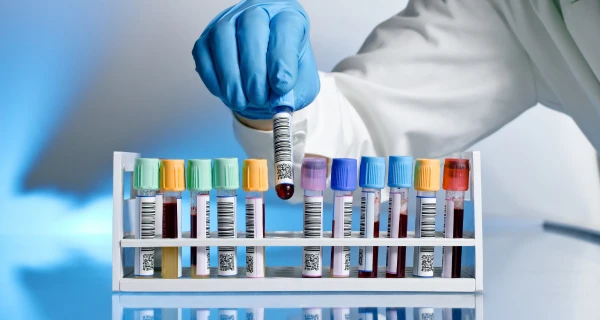
  • Biological sample labels
  • Blood bag labels
  • Tire tread labels
  • Dry cleaning tags
  • Postage labels
  • Warehouse inventory labels

Our final verdict on the Zebra ZT series

The ZT series is an extremely versatile industrial printer series with options for a range of industries and throughput volumes. Whether you’re looking to print blood bag labels for around 3-4 hours a day, or tire barcode labels from dusk until dawn there is a model in the ZT series to meet your needs.

As a value partner offering print solutions matched with application-based labels & ribbon, we feel our goal is to help match your on-demand labeling needs with the right printer. We hope this review helped you narrow down your printer options so you can find the best match for your facility.
Zebra ZT Series Barcode Label Printer Review (Benefits, Features, & Cost)

We have a team here at Computype that specializes in barcode label printers, printer processes, and printer troubleshooting. They work with a variety of makes and models from multiple manufacturers giving them a solid knowledge-base of how a variety of printers perform in different environments and in comparison to one another. One of the many label printer series our team has worked with is the Zebra ZT series.

As an authorized distributor of Zebra label printers, we actively promote and provide our customers with their equipment. We work with Zebra because after years of experience working with printers of all kinds, Zebra printers have consistently promised and delivered quality and high performance results that meet the needs of our customers.

Let’s take an in depth look at the ZT series as a whole and the three subseries it’s comprised of. We’ll discuss the features, benefits, limitations, and cost of all three.

What is the Zebra ZT series?

Zebra’s ZT series refers to their line of industrial printers. The “T” in ZT stands for tabletop, meaning compared to their desktop counterparts they are much larger and more robust. Though they are made with industrial environments in mind, these printers are extremely versatile and have proven useful in a diverse array of applications ranging from lab environments to manufacturing centers.

Most notably the ZT series differs from smaller desktop models in its larger size and ability to accommodate much larger volume print jobs—if you’re looking for something more compact for smaller label batches check out the ZD Series.

Within the ZT printer line are three sub-series: the ZT 200 series, the recently upgraded ZT 400 series and the ZT 600 series. All three are meant to serve facilities with different needs, so let’s take a look at each individually:

Zebra ZT 200 series

The ZT 200 Series models are the most basic models in the ZT series. With a 3-button, no-screen interface, standard dpi range and standard media capacity these printers keep it simple and serve as a great upgrade to a desktop solution if label printing volumes are on the rise.

The only major difference between the ZT 210 and ZT 220 is the difference in ribbon capacity. With a 450m ribbon capacity, the ZT 220 requires less frequent refill stops than the 210.

Ideal for moderate volume print jobs

In comparison to smaller desktop models, this printer is prepared to handle significantly larger jobs and will serve as a great higher throughput upgrade from a desktop solution.

Simple design and features

The interface is simple and all the standard features are there. This might not sound like much of a compliment but, in this case the minimalistic interface provides a user friendly experience and the lack of extra features keeps the focus on printing barcodes and an easy-to-train and operate system.

Budget friendly

Zebra is calling the printers in the ZT 200 series the ‘value models’. By keeping it simple they are able to offer all the most valuable features of an industrial printer at an economical price point.

Not for small scale printing

With the dpi options being 203 or 300 dpi this printer can provide clear crisp and scannable barcodes so long as they aren’t being printed at an extremely small scale.

A great majority of print jobs look great at 203 or 300 dpi, but scanning issues can arise when extremely small barcodes need to be printed.

Not intended for high volume print jobs

Although it is an industrial printer and is intended for higher volume printing than its desktop counterparts, the ZT 200 series is limited in its printing capabilities.

When it comes to higher volume label printing applications, these models are on the lower end of the throughput spectrum and would be best suited for moderate volume applications. These are not intended for 24/7 operation.

No screen

Although the lack of a screen can be helpful when it comes to keeping things simple, a bright and colorful screen can allow for at-a-glance status updates from a distance. This is helpful when an operator might not be available to keep a close eye on the printer.

Cost

The ZT 200 series is comprised of the industrial value models, due to their simplicity and economical price point.

If your facility is looking for an easy to use upgrade to a desktop printer or a moderate volume solution without any complicated features, a ZT 200 series model might be suitable.

The ZT 200 series starts around $980 (less than some desktop models) making it a budget friendly choice for any moderate volume application.

Zebra ZT 400 Series

The ZT 400 series is a long-time customer favorite, which is why Zebra decided to give it an upgrade. The familiar ZT 410 and 420 models are now the ZT 411 and 421.

The 411 and 421 continue to offer high resolution, width and RFID options but with a new, easier to navigate touchscreen interface.

User friendly interface

A colorful LCD touch display replaces the backlit screen and buttons on the previous ZT 400 series models for a more intuitive user experience and at-a-glance status recognition.

RFID

The ZT 400 series is capable of encoding UHF RFID tags so you can get ahead in implementing a smarter label solution.

Including RFID in your labeling solution can improve accuracy and efficiency by offering a faster scanning option and a back-up ID opportunity.

Ideal for larger volume applications

The 400 series is a great match for moderate to larger volume applications where they will be operating several hours each day. The high print speed options also let you print more in a limited span of time.

Wide printing capabilities

The main difference between the ZT 411 and the ZT 421 is the print width capacity. The ZT 421 is capable of print widths up to 6.6 inches!

Most label applications don’t require widths larger than 4 inches which makes it difficult to find label printers capable of higher width capacities. For those who have more unique applications that require wider labels, the ZT 421 is a great fit.

High DPI will slow you down

Although the option to purchase a 600 dpi model of the ZT 400 series (or 600 series) model is available, upgrading your print quality will lead to lower print speeds.

Under most circumstances, this won’t be an issue since industrial printers aren’t often used to print at small scale. A 203 or 300 dpi model will suit most applications.

Can’t print 24/7

The ZT 400 series is certainly intended for higher volume printing, however, it isn’t intended to print around the clock.

Cost

The best part about the upgrades to the 400 series is that they didn’t drive up the cost. Zebra is offering these future-ready printers for the same economical price as their predecessors. You can expect to spend at least $1,700 on your ZT 400 series printer and a bit more for each additional feature or upgrade you choose.

Zebra ZT 600 series

The ZT 600 is a very high-powered printer for high volume printing applications. It’s customizable in many of the ways the 400 series is–with RFID capabilities and an extended width option–but it features a simpler interface and a more durable outer casing.

This printer was built for harsh conditions and high demand making it ideal for fast-paced environments.

Ideal for 24/7 operation

The ZT 600 series features an extremely robust print engine suitable for around the clock operation. If your facility is struggling to find a printer capable of keeping up with your demand a 600 model is definitely worth checking out.

High speed printing

This printer was made with fast-paced environments in mind, so it only makes sense it would feature print speeds that can keep up with demand.

However, we always recommend slowing down when you can to optimize the scannability of your barcodes and reduce printhead wear.

Super durable

The ZT 600 Series features a metal media covering to protect your media and inner mechanisms from damage. This is especially helpful in industrial environments where printers are prone to damage from dust and debris. A window on the side also allows for easy media monitoring even when the protective case is closed.

Best suited for applications where it will run constantly

Very robust print engines run best when they are used frequently, so if you don’t plan on taking full advantage of the extremely high throughput capabilities of this printer you should consider a model in the 200 or 400 series.

Cost

Being the premium models in the ZT family they are priced for their performance. These are workhorses built to last through years of heavy use and the mechanics and engineering required to allow for this are valuable. Starting at $2,800, this piece of equipment should be considered a strategic investment.

This printer is capable of handling extremely demanding situations, whether that be due to environmental conditions, constant operation or both. In environments where a printer of this caliber is necessary, you will find value.

ZT series applications

Just like its desktop partner, the ZD, the ZT series is extremely versatile. We personally recommend it to our high production volume customers in every industry we work with, and many more industries find it useful as well.

The combination of durability, versatility, and the ability to accommodate ranging volumes make this series a great match for high performing facilities in a range of environments from warehouses to hospitals.

Here’s a list of printing applications we’ve seen customers utilize the ZT series printers to print labels on-demand for:

Our final verdict on the Zebra ZT series

The ZT series is an extremely versatile industrial printer series with options for a range of industries and throughput volumes. Whether you’re looking to print blood bag labels for around 3-4 hours a day, or tire barcode labels from dusk until dawn there is a model in the ZT series to meet your needs.

As a value partner offering print solutions matched with application-based labels & ribbon, we feel our goal is to help match your on-demand labeling needs with the right printer. We hope this review helped you narrow down your printer options so you can find the best match for your facility.

0
    0
    Your Cart
    Your cart is emptyReturn to Shop

    High-impact belt branding with pre-printed films.

    Pre-printed belt marking films deliver bold, consistent branding and high-resolution graphics across repeat manufacturing applications. These solutions support detailed imagery, precise color matching, and uniform visual presentation for product lines requiring fixed branding, standardized identification, and elevated product appearance.

    Professionally printed high-resolution rubber belt branding films.

    Pre-printed belt marking films support more detailed and visually controlled designs than standard ribbon-based marking systems. These solutions enable complex graphics, consistent color reproduction, and elevated product presentation across repeat manufacturing applications.

    photorealistic graphics

    High-resolution printing supports detailed imagery, gradients, and complex visual elements beyond the capabilities of standard ribbon-based marking systems

    custom color matching

    Match specific brand colors and visual standards across belt product lines, packaging systems, and broader manufacturing identification programs

    consistent production

    Pre-printed films maintain uniform logos, layouts, and visual presentation across large production volumes and repeat manufacturing applications

    Pre-printed films are commonly used for permanent logos, product branding, belt sizes, standardized identifiers, and highly detailed visual designs. Advanced printing capabilities support precise color control, sharp graphic definition, and complex imagery that extends beyond standard ribbon-based marking.

    Print belt marking films with critical production data.

    Print-on-demand belt marking gives manufacturers the flexibility to apply critical production data directly within active manufacturing workflows. These systems support information that cannot be predefined, including slab location codes, manufacturer dates, lot information, production identifiers, and changing product data across belt runs and manufacturing environments.

    A simple setup can integrate real-time labeling directly into your workflow.

    durable films

    Start with blank transfer films engineered for durable rubber belt marking.

    label software

    Create belt marking formats using label design and barcode software.

    compatible ribbons

    Use included thermal transfer ribbons to produce durable vibrant labels.

    industrial printers

    Use an industrial thermal transfer printer engineered for high duty cycles.

    Print-on-demand systems are designed for manufacturing environments where belt information changes continuously throughout production. Rather than relying on fixed inventory or pre-printed stock, these systems support dynamic marking requirements tied to production scheduling, traceability, and operational control.

    Reduce operational complexity with pre-printed labels.

    Use pre-printed warehouse labels to apply location IDs, pallet labels, and sequential label sets without managing printing in-house. This path works best when your data is defined and your warehouse layout follows a structured system.

    A simple setup can integrate real-time labeling directly into your workflow.

    Plan your labeling system in advance, then receive labels ready to apply across your warehouse. This approach shifts the work from daily printing to upfront setup and production.

    consistency at scale

    Apply the same label formats, barcodes, and ID structures across racks, pallets, and storage locations without variation.

    efficient operations

    Eliminate the need for printers, ribbons, software, and label inventory by using labels that arrive ready to apply and scan.

    sequence management

    Use sequential beam labels and serialized label sets to maintain ordered location IDs and guarantee no duplicates.

    Use pre-printed labels when your warehouse layout is defined, your location IDs are established, and you need consistent labeling across large areas or multiple facilities. This approach supports structured storage systems, standardized pallet tracking, and efficient label rollout.

    Print labels when inventory data changes in real time.

    Print warehouse labels in-house to create location IDs, pallet labels, and LPN labels as your warehouse changes. This path gives you direct control over how labels are created, updated, and applied across racks, bins, totes, and pallets.

    A simple setup can integrate real-time labeling directly into your workflow.

    durable labels

    Start with blank label stock engineered for racks, bins, totes, and pallets.

    label software

    Create warehouse label formats using label design and barcode software.

    compatible ribbons

    Use included thermal transfer ribbons to produce durable barcode labels.

    label printers

    Use a thermal transfer printer designed for warehouse label printing and daily use.

    Use print-on-demand labels when your warehouse layout changes, your team manages location IDs internally, or you need labels immediately without waiting on production. This approach supports flexible workflows, evolving storage systems, and real-time pallet and container tracking.

    Receive pre-barcoded tubes immediately ready-to-use.

    Receive tubes and vials with identifiers already applied through direct marking or integrated labeling. Eliminate labeling steps entirely while ensuring durable, consistent identification across storage, handling, and laboratory workflows.

    Pre-barcoded tubes for extreme durability and precision placement.

    Pre-barcoded labware removes labeling from your workflow entirely. Tubes arrive ready to use with verified identifiers, supporting faster processing, reduced handling, and consistent sample identification across storage and laboratory operations.

    consistency at scale

    Use pre-verified barcodes and markings to ensure consistent, accurate sample identification across all tubes and batches.

    efficient lab management

    Eliminate labeling steps and reduce manual handling during sample collection, processing, and storage workflows.

    labware prep™ services

    Receive labware sorted, packaged, and prepared to match your workflow, including options like tare weighing and kit assembly.

    Pre-barcoded labware fits high-throughput environments where labeling becomes a bottleneck or source of error. This includes biobanks managing large sample collections, clinical labs processing high volumes of patient samples, and research or CRO environments running automated or repeatable workflows where speed, consistency, and reduced handling drive efficiency and data integrity.

    Order pre-printed tube labels for guaranteed accuracy.

    Get tube labels professionally printed with controlled data, advanced converting, and durable materials. Eliminate in-house printing while ensuring every label meets performance requirements for laboratory use, including chemical exposure, handling, and storage conditions.

    Professionally printed laboratory tube labels for custom, sequential labels.

    Pre-printed labeling combines controlled printing, advanced converting, and durable materials to deliver consistent, ready-to-use tube labels. This approach removes variability from in-house printing and ensures every label meets your requirements for data accuracy and performance.

    unique ids

    Receive pre-printed labels with guaranteed unique barcode sequences, controlled serialization, and validated data across batches and production runs.

    custom design

    Use custom colors to organize samples, differentiate workflows, and improve visual identification across racks, boxes, and storage systems.

    durable finishing

    Use engineered label constructions with precoats and topcoats that improve resistance to chemicals, moisture, and routine laboratory handling.

    Pre-printed labeling fits laboratories that manage high volumes of consistent samples and require controlled, repeatable identification. This includes clinical labs processing patient samples, diagnostic labs running standardized assays, and research labs preparing large batches of tubes for studies or long-term storage where data does not change.

    Print tube labels on demand with real-time data.

    Print tube labels as needed using live data from laboratory systems. Generate labels during sample collection, aliquoting, or processing, with unique identifiers, timestamps, and variable data applied at the point of use. This approach supports workflows where sample data changes frequently or requires immediate, accurate identification.

    A simple setup can integrate real-time labeling directly into your workflow.

    Set up a complete labeling workflow using the right materials and equipment to print and apply labels directly during laboratory processes.

    durable labels

    Start with blank label stock engineered for small diameter tubes and vials.

    label printers

    Print high-resolution barcodes and text for small-format tube labels.

    compatible ribbons

    Use included thermal transfer ribbons to produce durable barcode labels.

    tube labelers

    Integrate tube label applicators for automated print-and-apply labeling.

    Print-on-demand labeling fits laboratories that generate or modify sample data in real time. This includes research labs, clinical labs, and diagnostic environments where samples are collected, processed, and labeled on demand, and where workflows require immediate identification without waiting for pre-printed labels.

    Use pre-barcoded microplates for ready-to-use identification.

    Receive microplates with identifiers already applied, eliminating labeling steps during plate setup and processing. Ensure consistent, durable identification across assays, screening, and storage while reducing manual handling and improving workflow efficiency.

    Pre-barcoded microplates for ultimate laboratory efficiency.

    Pre-barcoded microplates arrive ready to use with verified identifiers applied before delivery. This approach removes labeling from your workflow and ensures consistent identification across plate handling, processing, and storage environments.

    laboratory efficiency

    Eliminate labeling steps during plate setup, loading, and processing workflows.

    consistent identification

    Use pre-verified plate IDs to maintain accuracy across batches and screening runs.

    integrated services

    Receive plates sorted, kitted, or prepared to match assay workflows and laboratory processes.

    Pre-barcoded microplates fit high-throughput environments where plates move rapidly through automated workflows and labeling can create delays or variability. This includes automated screening facilities, compound and plate libraries, and CROs running large-scale studies, as well as core labs managing shared plate resources where speed, consistency, and reduced handling drive efficiency and improve data integrity.

    Order pre-printed microplate labels with consistent accuracy.

    Get microplate labels professionally printed with controlled data, advanced converting, and durable materials. Ensure consistent plate identification across batches while eliminating in-house printing and reducing variability in labeling for assays, screening, and high-throughput workflows.

    Professionally printed custom microplate labels.

    Pre-printed plate labels combine controlled printing, advanced converting, and durable materials to deliver consistent, ready-to-use identification. This approach ensures every plate label meets requirements for data accuracy, layout consistency, and performance across handling and processing.

    unique ids

    Receive pre-printed plate labels with guaranteed unique IDs, controlled sequencing, and validated data across batches and runs.

    custom design

    Use color coding to differentiate assays, plate types, or workflows and improve visual organization across plate libraries.

    durable finishing

    Use engineered label constructions that resist chemicals, handling, and environmental exposure during plate processing and storage.

    Pre-printed labeling fits laboratories that run standardized plate workflows with fixed data structures. This includes screening labs running standardized assays, diagnostic labs processing consistent plate formats, and research environments where plate layouts and identifiers remain consistent across runs.

    Print microplate labels on demand with real-time data.

    Print microplate labels as needed using live data from laboratory systems. Generate labels during plate setup, sample loading, or assay preparation, with well IDs, plate IDs, and variable data applied at the point of use. This approach supports workflows where plate data changes frequently or requires immediate, accurate identification.

    A simple setup can integrate real-time labeling directly into your workflow.

    durable labels

    Blank plate labels designed for small formats, flat surfaces, and secure adhesion on plates.

    label printers

    Print high-resolution barcodes and text for plate IDs and sample tracking.

    compatible ribbons

    Thermal transfer ribbons produce durable images resistant to chemicals, moisture, and handling.

    microplate labelers

    Apply labels consistently to plates during setup or automated workflows.

    Print-on-demand labeling fits laboratories that generate or update plate data in real time. This includes screening labs, genomics workflows, and assay development environments where plates are created, modified, and labeled during processing, and where accurate, immediate identification is required.

    Print blood bag labels at collection points.

    Print blood bag labels as needed using live data from blood bank systems. Generate labels during collection, component processing, or labeling steps, with donation identification numbers, product codes, and variable data applied at the point of use. This approach supports workflows where blood data updates in real time and requires immediate, accurate identification.

    A simple setup can integrate real-time labeling directly into your workflow.

    Set up a complete labeling workflow using the right materials and equipment to print and apply labels directly during blood collection, component processing, and blood bank handling workflows.

    durable labels

    Start with blank label stock engineered for flexible PVC blood bags.

    label printers

    Print high-resolution barcodes and text for complex blood label layouts.

    compatible ribbons

    Use included thermal transfer ribbons to produce durable barcode labels.

    label software

    Integrate barcode software to generate ISBT 128 labels and DIN data.

    Print-on-demand labeling fits blood banks and collection centers that generate or update donation data in real time. This includes blood collection sites, processing labs, and transfusion services where blood bags are labeled on demand, and workflows require immediate, accurate identification without relying on pre-printed labels.

    Control blood bag labeling with pre-printed formats.

    Get blood bag labels professionally printed with controlled data, advanced converting, and durable materials. Eliminate in-house printing while ensuring every label meets performance requirements for blood bank use, including handling, cold storage, and transfusion.

    Guarantee no duplicates with professionally printed blood bag labels.

    Pre-printed labeling combines controlled printing, advanced converting, and durable materials to deliver consistent, ready-to-use blood bag labels. This approach removes variability from in-house printing and ensures every label meets requirements for DIN accuracy, barcode performance, and reliable identification across blood bank workflows.

    consistency at scale

    Receive pre-printed labels with guaranteed unique DIN sequences, controlled serialization, and validated data across batches and production runs.

    accurate din formats

    Maintain consistent DIN formats to ensure accurate identification across blood bags, segments, and associated components.

    durable finsihing

    Use engineered label constructions designed to resist edge lift, moisture, and routine handling, helping maintain adhesion and readability throughout blood collection.

    Pre-printed labeling fits blood banks and collection centers that manage high volumes of donations and require controlled, repeatable identification. This includes blood collection sites, processing facilities, and transfusion services where standardized labeling, consistent DIN assignment, and stable data support efficient, validated workflows without frequent changes.

    Support accurate workflows with real-time labeling.

    In laboratory environments, data often isn’t final until the last moment—at the bench, at the instrument, or during sample handling. Printing labels on demand helps ensure each tube or vial reflects the most accurate information, while fitting naturally into the way your work actually happens.

    Support accurate workflows with real-time labeling.

    In laboratory environments, data often isn’t final until the last moment—at the bench, at the instrument, or during sample handling. Printing labels on demand helps ensure each tube or vial reflects the most accurate information, while fitting naturally into the way your work actually happens.

    A simple setup can integrate real-time labeling directly into your workflow.

    In laboratory environments, data often isn’t final until the last moment—at the bench, at the instrument, or during sample handling. Printing labels on demand helps ensure each tube or vial reflects the most accurate information, while fitting naturally into the way your work actually happens.

    compatible ribbons

    Compatible resin ribbons ensuring clear, durable print for barcodes and text

    compatible ribbons

    Compatible resin ribbons ensuring clear, durable print for barcodes and text

    In laboratory environments, data often isn’t final until the last moment—at the bench, at the instrument, or during sample handling. Printing labels on demand helps ensure each tube or vial reflects the most accurate information, while fitting naturally into the way your work actually happens.

    Support accurate workflows with real-time labeling.

    In laboratory environments, data often isn’t final until the last moment—at the bench, at the instrument, or during sample handling. Printing labels on demand helps ensure each tube or vial reflects the most accurate information, while fitting naturally into the way your work actually happens.

    A simple setup can integrate real-time labeling directly into your workflow.

    compatible ribbons

    Compatible resin ribbons ensuring clear, durable print for barcodes and text

    compatible ribbons

    Compatible resin ribbons ensuring clear, durable print for barcodes and text

    compatible ribbons

    Compatible resin ribbons ensuring clear, durable print for barcodes and text

    compatible ribbons

    Compatible resin ribbons ensuring clear, durable print for barcodes and text

    In laboratory environments, data often isn’t final until the last moment—at the bench, at the instrument, or during sample handling. Printing labels on demand helps ensure each tube or vial reflects the most accurate information, while fitting naturally into the way your work actually happens.

    Support accurate workflows with real-time labeling.

    In laboratory environments, data often isn’t final until the last moment—at the bench, at the instrument, or during sample handling. Printing labels on demand helps ensure each tube or vial reflects the most accurate information, while fitting naturally into the way your work actually happens.

    A simple setup can integrate real-time labeling directly into your workflow.

    In laboratory environments, data often isn’t final until the last moment—at the bench, at the instrument, or during sample handling. Printing labels on demand helps ensure each tube or vial reflects the most accurate information, while fitting naturally into the way your work actually happens.

    durable labels

    Durable labels that stay attached through handling, storage, or cryogenic conditions

    compatible ribbons

    Compatible resin ribbons ensuring clear, durable print for barcodes and text

    reliable printer

    Compact, consistent, durable thermal transfer printing at the point of use

    label software

    Label management software to format labels and connect to sample data or LIMS

    In laboratory environments, data often isn’t final until the last moment—at the bench, at the instrument, or during sample handling. Printing labels on demand helps ensure each tube or vial reflects the most accurate information, while fitting naturally into the way your work actually happens.

    Request a quote

    Take advantage of our volume discounts for bulk orders. Reach out to us for a personalized quote tailored to your needs.

    "*" indicates required fields

    This field is for validation purposes and should be left unchanged.